Trustindex verifies that the company has a review score above 4.5, based on reviews collected on Trustindex over the past 12 months, qualifying it to receive the Top Rated Certificate.
Real examples of our custom AI Agents at work
Unsigned Consultation Agent Revenue
Family lawTampa, FL6-attorney firm
A six-attorney family law firm in Tampa recovered $186,000 in fees from 612 consultations it had already written off, signing 23 new matters in six months.
How it works
Finds consultations from the past 18 months that never became matters
Reads the notes to understand why each consultation stalled: fee, timing, or a client still deciding
Follows up based on that reason, in the attorney's voice, on a measured cadence
Stops when someone replies, hands the conversation to the attorney, and permanently removes opt-outs Attorney takes over
Results
$186kIn fees from consultations the firm had written off23 matters, $8.1k average
23Matters signedin six months
612Old consultations worked18 months of backlog
Past consultations receiving follow-up
before 12%
now 100%
Matters signed each quarter from that list
before 1
now 12
Time Capture Agent Cash recovered
Business litigationDenver, CO14-attorney firm
A 14-attorney business litigation firm in Denver recovered $31,000 a month in billable time after billing leakage fell from 11% to 4%.
How it works
At the end of each day, it reviews the timekeeper's calendar, sent email, document activity, and call log
Matches each activity to the right matter
Drafts time entries in the timekeeper's own style and flags work that was done but never billed
Queues each entry for review, editing, approval, or deletion. Nothing reaches an invoice without approval Attorney approves
Results
$31kBillable time recovered every monthaverage across six months
4%Billing leakagedown from 11%
12,400Entries draftedevery entry reviewed by a human
Billable time lost to reconstructing work from memory
before 11%
now 4%
Time entered the same day it was worked
before 18%
now 94%
Document Chase Agent Capacity freed
ImmigrationChicago, IL9-attorney firm
A nine-attorney immigration firm in Chicago freed 22 paralegal hours a week and cut the time to a complete file from 21 days to 12.
How it works
Tracks every outstanding document for every open matter
Follows up on the firm's schedule, in the client's language
Checks each document against the list, files it, and stops requesting that item
Escalates to a paralegal after three unanswered attempts. An attorney approves every message template Attorney approves
Results
22 hrsParalegal time saved every weekacross two staff
12 daysTo complete the filewas 21 days
1,140Documents collectedacross 260 matters
Paralegal hours spent chasing documents weekly
before 30 hrs
now 8 hrs
Days from engagement to complete file
before 21
now 12
Matter Watch Agent Time returned
Estate planning & probateCharleston, SCSolo practice
A solo estate planning and probate attorney in Charleston got 6.5 evening and weekend hours back each week, with no matter left inactive for more than 14 days.
How it works
Checks every open matter overnight for approaching deadlines, inactivity, and unanswered client emails
Prioritizes what it finds by potential risk
Sends the attorney one short list at 7 a.m., with a draft email ready for each item
Sends nothing to the client itself. Every draft waits for the attorney, and every deadline is flagged for confirmation before it is calendared Attorney sends
Results
6.5 hrsEvening and weekend time saved each weekdown from 9 hrs of file review
0Matters with no activity for 14+ dayspreviously 11 at a time
63Matters reviewed nightly8,250 checks since April
Open matters with no activity for 14+ days
before 11
now 0
Evening and weekend hours spent on file review
before 9 hrs
now 2.5 hrs
Results vary by firm, practice area, and existing systems. Each agent was designed, built, and is maintained by Pioneerly.
An AI agent is not a chatbot
AI agents for law firms often get lumped in with chatbots and simple automations. The difference becomes obvious the moment something slips on a matter.
The situation
Your client's medical records were due Monday. It is now Tuesday morning, and they still have not arrived. Last week, the client told you the clinic had quoted six to eight weeks.
Here is how each tool handles it.
Chatbot vs automation vs AI agent: how each one handles the same late medical records at a law firm
Question
A chatbot
An automation
An AI agent
Does it notice the records are late?
No. It only knows what someone tells it.
No. It follows a trigger or schedule, not the matter itself.
Yes. It checks every open matter each morning.
What does it do next?
Nothing until someone opens it and asks.
Sends the reminder it was programmed to send.
Reads the matter and works out where the delay actually is.
Who does it contact?
Nobody.
The client, because that is what the workflow was set to do.
The clinic, because the client is not the one causing the delay.
How much of it runs without you?
None of it. It only does something when you are using it.
All of it, even when the next step no longer makes sense.
As much as you choose. Routine follow-up can run on its own, while you decide what needs attorney review first.
A chatbot needs you to notice the problem. An automation follows the workflow it was given. A legal AI agent reads the matter, works out what is actually holding it up, and takes the next step with whatever level of attorney review you choose.
Our most popular AI agents for law firms
Each one handles a specific job from start to finish. Most firms start with the one creating the most drag, risk, or lost revenue.
Winning more work
After-Hours Intake Agent
Answers and qualifies new inquiries after hours, then books the right ones directly onto an attorney's calendar.
Runs when a new inquiry comes in after hours
Referral Partner Agent
Keeps referral partners updated on the matters they send you, without your team having to remember each follow-up.
Runs when a referred matter hits a milestone
Review Request Agent
Asks satisfied clients for a Google review at the right moment, while routing unhappy clients to a partner first.
Runs when a matter closes on a positive note
Running matters smoothly
New Matter Setup Agent
Sets up the engagement letter, folders, calendar entries, tasks, and welcome email the same way every time.
Runs when a new matter is opened
Records Summary Agent
Turns medical records or discovery into a dated chronology, with a page citation for every entry.
Runs when records arrive in the matter
Meeting Prep Agent
Builds a one-page brief before a client meeting, hearing, or deposition: status, open issues, deadlines, and the latest communication.
Runs overnight against the next day's calendar
Revenue and risk
Invoice Chase Agent
Follows up on overdue invoices on your schedule, stops when payment arrives, and escalates anything past your threshold.
Runs when an invoice becomes overdue
Retainer Top-Up Agent
Monitors trust balances and asks clients to replenish before funds run low enough to slow the matter down.
Runs when a trust balance hits your floor
Conflict Check Agent
Screens prospective matters against client and adverse-party records, then flags anything that needs attorney review. It never clears a conflict itself.
Runs before a new matter is opened
These are some of the legal AI agents firms ask us for most. If one repetitive job is quietly eating your team's week, tell us about it.
Every month, you see exactly how much your AI agent saved your firm.
Tasks handled, hours returned, and revenue recovered.
Included with every AI agent we build
Monthly statementAugust
Document Chase agent
Tasks it handled
412
Hours returned to your team
61
Your blended rate
$295 / hr
Value returned$17,995
Illustrative figures. Your statement is built from your own matter data and preferred metrics.
Our AI agents are built around the rules your firm has to follow
Compliance starts with how the agent is built. Before we put an AI agent to work at your firm, we make sure it follows the rules that apply to your state, your practice, and the job you want it to do.
01
The rules every lawyer works under
We start with the ABA Model Rules covering competence, supervision, confidentiality, client communication, and advertising. Formal Opinion 512 applies those duties directly to generative AI.
1.1 Competence
1.4 Communication
1.6 Confidentiality
5.1 & 5.3 Supervision
7.1 Advertising
Formal Op. 512
02
The rules your state adds
Your state may change the wording, add stricter advertising or solicitation rules, set trust-account and retention requirements, or publish its own AI guidance. We build to the rules that actually apply in your state.
Your state's Rules of Professional Conduct
Advertising & solicitation rules
State bar AI guidance
Trust accounting and IOLTA
File retention schedules
03
The rules the job itself brings
The agent's job determines what else applies. A legal AI agent handling medical records raises different issues than an agent following up on an invoice or texting a prospective client.
HIPAA
TCPA, for calls and texts
FDCPA, for collections
State privacy statutes
Court and e-filing rules
The guardrails are built into the agent
We don't just tell the agent what it should and shouldn't do. We limit what it can access, keep a record of what it does, and give your firm control over when it runs.
Limited access
Each agent can see only the systems and information it needs for its job. An invoice agent, for example, can't access unrelated matter files.
Your systems
The agent works inside your existing systems, so client data doesn't need to be copied into ours.
Full activity log
You can see what the agent did, when it did it, and review its actions anytime.
Instant pause
You can stop any agent immediately without affecting the others.
What can a law firm automate with an AI agent?
AI agents work best on repeatable work your firm handles all the time. The more often a task comes up and the more consistent the process, the stronger the case for building one.
More repeatable
Strong fit for an AI agent
Appointment reminders
Setting up a new matter
Requesting client reviews
Following up on unpaid invoices
Capturing time entries
Following up on missing documents
Handling new inquiries
Needs more judgment
Triaging the firm's inbox
Summarizing case records
Drafting a demand letter
Handling a difficult client call
Usually not worth building
Annual bar filings
Year-end file archiving
Updating the fee schedule
Onboarding a new hire
Keep this with the lawyer
Winning a new client
Settlement strategy
Preparing for trial
Arguing a motion
Cross-examining a witness
Happens more often
Wondering whether a task at your firm is worth turning into an AI agent? Tell us what it is.
How we build
A legal AI agent your firm can rely on
We build the technical side and the legal guardrails together. At each stage, the agent has to meet a clear standard before we move on.
01
Define exactly what the agent should do
We start with one specific job, when it should run, what information it can use, what it should produce, and where it must stop. The clearer the job, the more reliable the agent.
Stage checklist
We identify the rules that apply to this job, in your state and practice area, before we design anything.
02
Choose the right tools for the job
No model is best at everything. We test the strongest options on your actual work and choose the one that gives the right balance of accuracy, speed, and cost. A records agent and a drafting agent may need completely different models.
Stage checklist
Before we choose a model, we confirm where your data sits, who can process it, and what any vendor is allowed to retain. Your firm's data isn't used to train anyone else's model.
03
Teach it how your firm works
The agent works from your documents, templates, and matter data so its output reflects how your firm actually works. When it isn't sure, it's built to say so instead of guessing.
Stage checklist
Every important output has to be checkable. If something can't be traced back to a source, the agent shouldn't present it as fact.
04
Test it on real work before it goes live
We test it on examples drawn from real matters, including the messy ones: missing documents, unclear facts, and situations where the right answer is to stop and ask a person.
Stage checklist
We agree on what good enough looks like before launch. The agent doesn't go live until it meets that standard.
05
Launch it, monitor it, improve it
Once it's live, we monitor how it performs and keep a full log of what it does. If we change the model or instructions, we test the updated version before it reaches your firm.
Stage checklist
You can see what the agent did, when it did it, and which version was running. You can pause it or roll back a change anytime.
The technology behind our AI agents
We're not tied to one model or platform. We choose the technology for the job, your systems, and your requirements, and change it when a better option makes sense.
Models
Claude / GPT / Gemini / Llama / Mistral / task-tuned small models. Often more than one inside a single agent: a large model to reason, a small one to classify.
Where it runs
AWS Bedrock / Azure OpenAI / Google Vertex AI / your own tenancy. Enterprise tiers, in the region you need, with your inputs excluded from training.
Orchestration
LangGraph / tool calling / Model Context Protocol / schedulers and queues. The logic deciding what happens next and when to hand over to a person.
Retrieval
Hybrid vector and keyword search / embedding models / pgvector / OpenSearch / OCR and document parsing.
Integrations
Clio / MyCase / PracticePanther / Smokeball / NetDocuments / Microsoft 365 / Google Workspace / Slack / Twilio.
Security
SSO / scoped service credentials / encryption in transit and at rest / per-agent permissions / retention rules you set.
Evaluation
Graded eval sets / tracing and observability / versioned releases / a regression run on every change.
Pricing
Automate the repetitive work at your firm
Standard AI agent
Best for: one clear job in one or two systems, running the same way every time.
From$1,500one-time build
Time to liveiFrom kickoff to the agent running on live work, including the workflow audit, the build and the testing.1 to 2 weeks
Systems connectedUp to two
Decision logiciWhether the agent follows one path every time, or branches on what it finds in the file.One path
Check-ins during the buildAt scope and launch
Monthly performance reportiWhat the agent handled that month and how it performed.Included
Ongoing supportiMonthly monitoring, repairs, logic updates, re-testing and reporting. Month to month, cancel any time. Stop it and the agent keeps running.Optionalquoted with the build
The job mapped end to end, with what the agent will and will not do written down
A rules review for your state, your practice area and the job itself
Model benchmarking on your own work, not on a generic test
Integration into the systems your team already uses
A graded test set built from your real matters, and a pass threshold agreed with you
A briefing for your team on how it runs and how to supervise it
Documentation, accounts and handover
Advanced AI agent
Best for: several systems, decisions that branch, or anything client-facing running at volume.
From$3,000one-time build
Time to liveiFrom kickoff to the agent running on live work, including the workflow audit, the build and the testing.3 to 5 weeks
Systems connectedNo limit
Decision logiciWhether the agent follows one path every time, or branches on what it finds in the file.Branching
Check-ins during the buildWeekly
Monthly performance reportiWhat the agent handled that month and how it performed.Included
Ongoing supportiMonthly monitoring, repairs, logic updates, re-testing and reporting. Month to month, cancel any time. Stop it and the agent keeps running.Recommendedquoted with the build
Covers: AI agent design, build, testing, and launch. You know the price before we start, and most agents go live within one to five weeks.
Mapping the job from start to finish and defining exactly what the agent should and shouldn't do
Reviewing the rules that apply to your state, practice area, and the job itself
Testing models on your own work, then building the agent with the best fit
Connecting the agent to the systems your team already uses
Testing the agent against examples built from your real matters
Showing your team how the agent works, what to watch for, and how to supervise it
Documentation and handover. The agent belongs to your firm from day one.
Monthly
Ongoing support
No long-term commitment.
Monitoring the agent in live use so problems are caught early
Fixes when a system or integration it depends on changes
Updates as your firm's workflow changes
Re-testing the agent whenever we change the model, instructions, or logic
A monthly report on what the agent did, how it performed, and what we changed
Direct access to the person who built your agent
Small tweaks and extensions included
What do you want to automate at your firm?
Describe one job at your firm and we'll tell you whether an AI agent should do it, what it would take, and what it would cost. We'll review your request and come back with feedback and a quote shortly.
This is a Pioneerly intake agent, not a chat. Your message will be reviewed by our team, and you’ll receive a reply by email within 1–2 business days.
Frequently asked questions
Each agent is priced as a one-time build. A standard agent, meaning one clear job across one or two systems, starts at $1,500. An advanced agent, meaning several systems or decisions that branch, starts at $3,000. The fee covers scoping, the rules review, model selection, the build, testing and handover, and it is quoted and agreed before any work begins.
After launch there is an optional monthly care plan, quoted with the build. There are no per-user seat fees, so a four-person firm pays the same as a forty-person firm for the same agent.
Every agent we build comes with a monthly performance report. It shows how many tasks the agent handled, how many hours that returned to your team, and what those hours are worth at your firm's rates, so the saving is a number you can check rather than a claim we make.
The report is included with every agent, whether or not you take the care plan, and it is built from your own matter data.
A standard agent takes one to two weeks from kickoff to running on live work. An advanced agent takes three to five weeks. Most of that time is scoping and testing rather than building, because the agent does not go live until it passes a standard you agree to in advance.
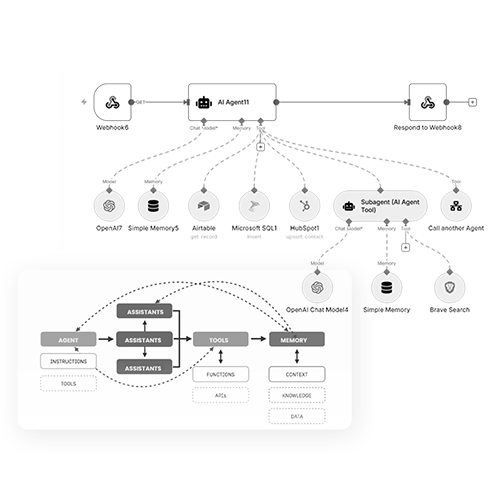
A chatbot waits to be asked a question and answers it. An AI agent does the work. It runs on a trigger, such as a new inquiry, a deadline or a change in a matter, it reads and writes in the systems your firm already uses, and it either finishes the task or stops and hands it to a person.
A chatbot can tell you a medical record is missing. An agent notices it is missing, requests it, logs the request, follows up until it arrives, and tells you when it does.
You own it. The agent, the logic, the documentation and the accounts are yours from day one. If you stop the care plan, the agent keeps running. Nothing switches off, and nothing is held back to keep you subscribed.
The care plan is optional, month to month, and priced per agent. It covers monitoring in production, repairs when a system the agent depends on changes underneath it, updates to its logic as your workflow shifts, a full re-test whenever a model or instruction changes, and a direct line to the person who built it.
Most firms keep it on anything client facing, because those are the agents where a quiet failure costs the most. You can cancel at any time and keep the agent.
The work that comes up constantly and runs roughly the same way every time: chasing missing documents, capturing billable time, following up on unpaid invoices, opening new matters, responding to new inquiries, sending appointment reminders, requesting client reviews.
Judgment work stays with the lawyer. If a task only comes up twice a year, or the right answer changes every time, an agent will cost more to build than it saves. If you are not sure where your task sits, describe it and we will tell you honestly.
No. Agents are built into the systems your firm already uses, including Clio, MyCase, PracticePanther, Smokeball, NetDocuments, Microsoft 365, Google Workspace, Slack, and phone or SMS platforms. If your setup is unusual, we confirm at scoping whether it can connect before you commit to anything.
No. We run models on enterprise tiers through providers such as AWS Bedrock, Azure OpenAI and Google Vertex AI, or inside your own tenancy, with your inputs excluded from training. Data stays in the region you require, access is scoped per agent, and you set the retention rules. Confidentiality under ABA Model Rule 1.6(c) is part of how the agent is designed, not a policy we point at afterwards.
Agents are built to stop rather than guess. You decide what the agent may send on its own and what waits for a lawyer, and you can change that at any time. Anything it asserts has to trace back to a source, every action is logged along with the version that was running, and you can pause it or roll back a change yourself.
On the care plan we monitor it in production, so problems are usually caught before they reach a client, and repairs are included.
Yes, with supervision. ABA Formal Opinion 512 and Model Rules 1.1, 1.4, 1.6 and 5.1 and 5.3 do not prohibit AI. They require competence, confidentiality, communication with the client, and supervision of non-lawyer assistance, which includes the output of an AI agent.
That is why every agent we build has explicit approval points, a full log, and a named person at your firm who supervises it. State rules vary, so we run a rules review for your state and practice area before we design anything. None of this is legal advice about your own obligations.
That depends on your state and on what the agent actually does, and the decision is yours. Some firms disclose everywhere, others only on client-facing communication. We build to the rule you set, including the exact wording, and anything the agent says to a client is reviewed against ABA Model Rule 7.1 on misleading communications before it goes live.
No, and firms that buy one for that reason are usually disappointed. An agent takes the repetitive part of a job: the chasing, the logging, the reminders, the status updates. What is left is the part that needs a person, which is most of why you hired them. Most firms use the returned hours to handle more matters without hiring, rather than to cut the team.
No. Most of the agents we build are for solo and small firms, because that is where one person is doing five jobs and the repetitive one is the first to slip. What matters is not headcount, it is how often the task comes up. A solo who chases documents forty times a week gets more back than a large firm that does it twice.
Yes, and we recommend it. One agent on one clear job gives you a working system and a real number within a few weeks. The second and third are easier to scope once you have seen how your data, your systems and your team actually behave.
Whichever one performs best on your work. We are not tied to a single vendor. Depending on the task we use Claude, GPT, Gemini, Llama, Mistral or a small task-tuned model, and often more than one inside a single agent: a large model to reason, a small one to classify. We benchmark the options on your actual matters before choosing, and we can move to a better model later without rebuilding the agent.
Matt and I founded Pioneerly, and we still take every first consultation ourselves.
We built our firm to give law firms a better alternative to traditional legal marketing agencies. The right fit and good relationships mean a lot to us, and we hope they matter to you too.
Tell us where your firm is today and where you want to take it. We'll tell you what we see and what we think.
Talk to you soon.
Piotr & Matt
Piotr Szalkiewicz
Matt and I built Pioneerly around the kind of relationships where we can speak openly, trust each other, and build something we’re proud of.
That’s especially important when you’re bringing someone into your firm as a fractional CMO. This first conversation is a chance for us to get to know each other.
Tell me where your firm is today and where you want to take it. I’ll give you an honest view of what I’d focus on and whether I’m the right person to help.
Talk to you soon.
Piotr
Matt Sarson
Piotr and I founded Pioneerly because we believed law firms deserved a better marketing partner. That starts with getting to know the person you’ll be working with.
As your fractional CMO, I’d be working closely with you and your team, so the right fit matters to both of us.
Tell me about your firm, your ambitions, and what’s getting in the way. I’ll share my perspective and how I could help.